Stop the Frustration! Free Bank Reconciliation Tool in Seconds.
Bank reconciliations that stop getting done are one of the most common findings in small business or local government audit — and the usual cause is not carelessness. It is turnover. Someone leaves, nobody picks it up, and by the time anyone notices there are four months to catch up on and no obvious place to start. Audrey is a free tool that compares your general ledger export against your bank statement and tells you exactly what does not match, and why.
Ready now?
Upload two files and get the differences back in about a minute. Free, no sign-up, nothing stored.
Two things to have ready:
- Your books — a general ledger transaction detail report for one cash account. Not a trial balance or a summary. In QuickBooks that is Transaction Detail by Account; in Tyler, Account Inquiry; in BS&A, GL Account Detail.
- Your bank statement — downloaded from your bank. CSV, Excel (.xlsx) or OFX/QFX. A PDF will not work yet.
Why reconciliations stop getting done
State audit offices publish their most common findings, and “bank reconciliations not performed timely” appears on those lists year after year — the Tennessee Comptroller lists it among the ten most common audit findings for municipalities. The guidance is usually that reconciliations should be completed within about thirty days of receiving the statement, and reviewed by someone other than whoever prepared them.
What the findings also show is the cause. Reconciliation failures cluster around staff changes — a finance director leaves, a deputy retires, a new accounting system arrives the same quarter — and the work quietly stops. Nobody decides to stop doing it. It simply has no owner for a few months, and then the backlog is the reason not to start.
That matters more than it sounds. The bank reconciliation is the control that catches errors and misappropriation in cash. When it lapses, auditors do not just note the lapse; they note that errors, missing amounts, and misidentified items could go undetected. It is one of the few findings that is both easy to fix and awkward to explain.
What reconciling actually involves
Every line on the bank statement should have a match in your books, and every line in your books should have a match on the statement. Whatever is left over falls into a small number of categories:
- On the statement, not in your books. Bank fees, interest, returned items, card settlements. These need an entry — and this is where money most often goes missing.
- In your books, not on the statement. Cheques not yet presented, deposits in transit. Usually timing, unless one is old.
- On both sides but not quite matching. A transposed digit, a wrong date, a duplicate.
- Items that cancel each other out. A charge and its reversal on the same day.
Doing that by hand across a few hundred lines is slow and error-prone, which is exactly why it slips. Doing it across four months of backlog by hand is why people give up.
Getting the right export
More reconciliations fail on the export than on the arithmetic. Four settings matter, and each one breaks the result differently:
- One bank account, not pooled or combined. The statement covers one account, so the books have to as well. Pull pooled cash and nothing will tie.
- Every source, not just the counter. Cheque runs and payroll are most of the money going out. A report filtered to cashiering entries misses them.
- Detail, not totals. A report grouped by day has already done the grouping, and done it wrongly for this purpose — a day’s total cannot be matched against the individual deposits that make it up.
- Run the dates about a week past the period end. Something banked on the 30th that cleared on the 2nd is timing, not a missing entry. Cut the export at month end and every one of those looks like a problem.
What this bank reconciliation tool gives you back
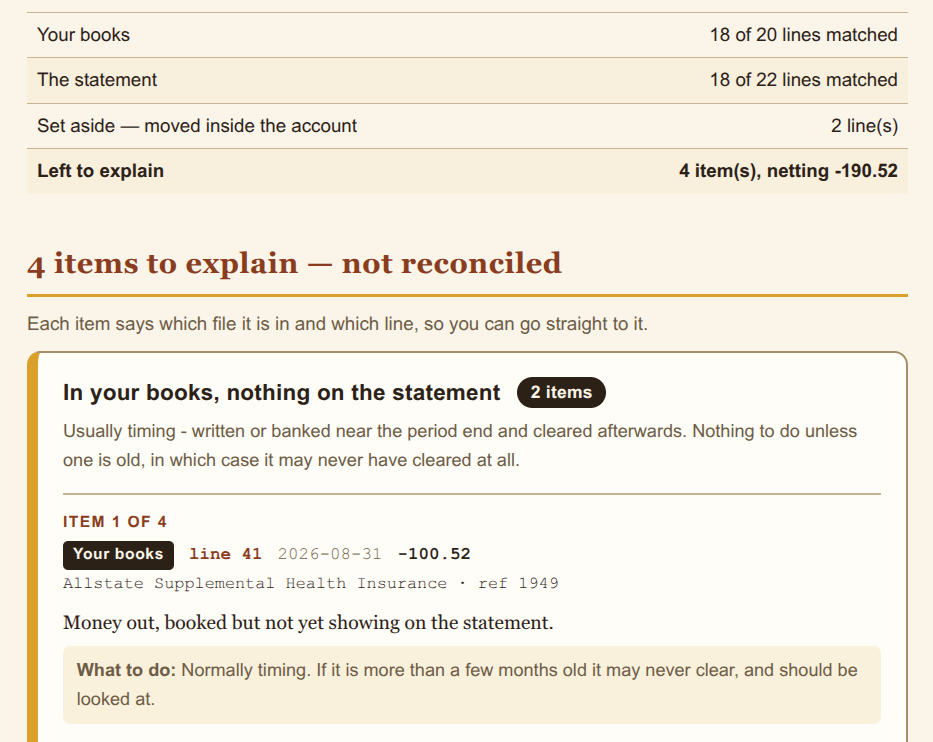
A report by email, with the leftover items grouped by what you need to do about them. Each one says which file it is in, which line, the date, the amount and the description — so you can go straight to it rather than hunting.
It also produces a record of reconciliation: the period, both file names with checksums, when it was run and who requested it, and a line for a reviewer to sign. That is the page for your audit file, and it is the thing a Mayor or council member can review without being an accountant.
Two further checks come as standard. Audrey runs a proof of cash — the four-column reconciliation that ties opening balance, money in, money out and closing balance on both sides. Ending balances alone can agree while the money in and out does not, and an unrecorded receipt offset by an unrecorded payment leaves a perfect-looking balance. And it tells you what it had to assume about your files, because if an assumption is wrong the result is wrong.
Nothing is stored. Your files are processed to produce the report and then deleted. There is no account, no history, and no copy kept.
What it does not do
Audrey compares two files and reports the differences. It is not an audit, not an attestation, and not accounting advice, and using it does not discharge any obligation your organization has to prepare, review, or have audited its own records.
Where it proposes a correcting entry, that is a draft prepared from the data you supplied, for your finance officer or accountant to review. Audrey posts nothing and connects to nothing.
And a reconciliation that balances is not proof that either record is correct. Two offsetting errors reconcile perfectly. Audrey can tell you that two sets of figures agree; it cannot tell you the underlying transactions were recorded properly or happened at all.
Try it on last month
Two files, about a minute, and you will know where you stand.
Questions, or only have a PDF? audrey@brooksidepayments.com · (833) 382-1992