Tip Screen Best Practices: How to Set Up Prompts Without Alienating Customers
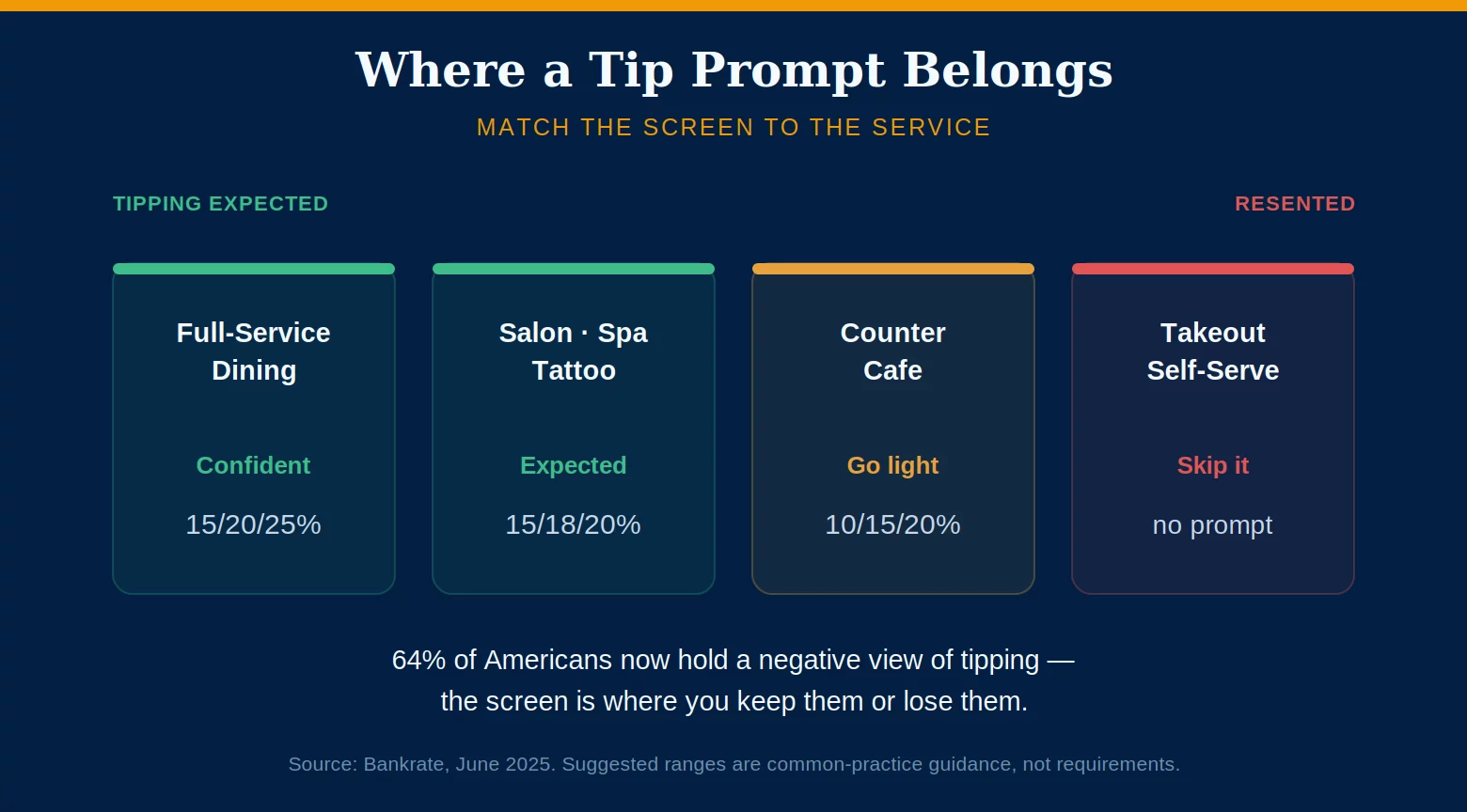
Tip screen best practices come down to one uncomfortable truth: the same prompt that earns your staff more money can quietly cost you customers. Digital tip screens genuinely raise gratuities — businesses that add one typically see tipping volume climb around 26% — but the backlash against them is real and growing. The entire difference between a tip screen that helps your business and one that hurts it is in how you set it up.
This is a plain, merchant-first guide: where a prompt belongs, where it breeds resentment, what percentages to suggest by business type, and the setup mistakes that turn a revenue tool into a one-star review. Get the tip screen best practices right and the screen quietly pays for itself; get them wrong and it shows up in your ratings.
There Are Two Tipping Economies: Know Which One You’re In
The tipping data looks contradictory until you separate it into two worlds. Where tipping is genuinely expected, it is stable and healthy. Where a screen prompts for it anyway, it is resented and falling. Your setup should respect that line.
In full-service restaurants, Square’s transaction data shows the median tip essentially flat — about 19.4% in late 2024 versus 19.6% back in 2019. Sit-down dining, salons, spas, tattoo, and other personal-care services are the same story: customers still tip around 20% without complaint, because a person clearly served them. In these settings a confident tip prompt is expected and welcome.
The other economy is counter service, takeout, and self-serve. Square’s digital food-and-beverage tips fell to about 14.9% in mid-2025 from 15.5% in 2023, and only roughly 12% of people say they always tip at fast-casual counters. The complaints there aren’t about the money — they’re “why am I being asked to tip when I picked up the order myself?” Getting your tip screen best practices right starts with knowing which economy your business lives in.
The Tip-Screen Backlash Is Measurable
“Tip fatigue” is not a social-media exaggeration; the surveys are consistent and the trend is worsening. This matters to you as an owner because resentment at the screen turns into lower reviews, weaker loyalty, and rising “no tip” selections over time.
A June 2025 Bankrate survey found 64% of Americans hold at least one negative view of tipping — up five points in a year — and 38% are specifically annoyed by pre-entered tip screens, up from 34% the year before. Pew found 40% oppose suggested tip amounts on a screen or bill. And an August 2025 Temple University study found that prompting for a tip before service actually lowers customer satisfaction by creating resentment before the interaction even happens.
The takeaway isn’t “remove the screen.” It’s that aggressive prompts spike short-term tips while driving up negative reviews and no-tip rates — so thoughtful tip screen best practices protect the goodwill that makes tipping work at all.
Tip Screen Best Practices: How to Configure Without the Backlash
Every modern point-of-sale system — Square, Toast, Clover, and the rest — lets you control the suggested amounts, the timing, the default, and whether the prompt appears at all. POS tipping settings are fully in your hands, which means the backlash is too. These are the settings that separate a healthy tip screen from a resented one. Good tip screen setup is a handful of deliberate choices, and the tip screen best practices below map to each one.
Match the suggested percentages to your service type (see the table below). Prompt after service is delivered, not before. Keep a clear, visible “No Tip” button — hiding or shrinking it is a dark pattern customers notice. Offer a custom option, and show the dollar amount next to each percentage so no one has to do mental math. A short line like “tips go directly to our team” builds goodwill.
Don’t pre-select a high default — a screen defaulting to 30% that a customer taps by accident feels like a trick, and your employee absorbs the anger. Don’t inflate the range (starting at 20% and climbing to 35%) in a counter setting. Don’t prompt where no human service occurred, like a self-serve kiosk or a grab-and-go handoff — that’s exactly where resentment is highest. And never stack a tip prompt on top of an automatic service charge; double-tipping produces angry customers.
Suggested Tip Percentages by Business Type
There is no single right set of suggested amounts — the right tip screen best practices depend on your format. Anchor your suggestions to what customers already expect in your setting rather than to the highest number the terminal will allow.
| Business Type | Suggested Prompts |
|---|---|
| Full-service restaurant | 15% / 20% / 25% |
| Upscale / fine dining | 20% / 25% / 30% |
| Salon, spa, tattoo, personal care | 15% / 18% / 20% |
| Counter service / cafe | 10% / 15% / 20% (lighter) |
| Takeout / self-serve / kiosk | Consider no prompt |
Whatever you choose, keep the three options within a range your customers already recognize. The fastest way to trigger tip fatigue is to move the anchors — a counter that suggests 25/30/35% reads as a cash grab, not a courtesy. That single choice is where most tip screen best practices quietly succeed or fail.
Frequently Asked Questions
Usually not, or only lightly. This is exactly where tip fatigue is worst — customers resent being prompted when no real service occurred, and surveys show most people don’t tip at counters anyway. If you do prompt, keep the suggestions low (10–15%) and the “No Tip” option obvious. A confident prompt belongs in full-service and personal-care settings, not on a grab-and-go handoff.
Anchor them to your format: 15/20/25% for full-service dining, 20/25/30% for upscale, 15/18/20% for salons and personal care, and a lighter 10/15/20% for counter service. The core tip screen best practice is to stay inside the range your customers already expect — inflating the anchors is what triggers backlash.
Yes — measurably. Businesses that add a digital tip prompt commonly see tipping volume rise around 26%, and digital tips tend to run higher than cash. The catch is that aggressive setups raise short-term tips while damaging reviews and loyalty. Configured well, a tip screen lifts staff earnings without the backlash; configured poorly, it does both.
Get Your Tip Screen Configured the Right Way.
Your point-of-sale setup decides whether tips help your staff or hurt your reviews. Send us a recent statement and we’ll review your processing and terminal setup — suggested amounts, tip adjustment, and tip-out reconciliation — so your tip screen best practices are working for the business, not against it. Learn more about card processing consumer protections from the CFPB.
Get a Free Statement ReviewNo obligation • No pressure • Response within one business day
See what a statement review looks like →