What Is a Batch Fee, and Why the Same $0.25 Costs Some Merchants $730 a Year
You see the line on your processing statement. BATCH FEE — $7.50. Or maybe it shows up as BATCH SETTLEMENT or DAILY BATCH with the same kind of small number next to it. You already feel the answer before you ask the question: it’s small enough to ignore. Whatever it is, it’s not breaking the budget.
That feeling is the entire reason the batch fee survives on processing statements at all. It is engineered to be small enough to ignore. The math behind it is engineered to compound anyway. Most merchants paying it are paying somewhere between $90 and $730 a year, depending on a single setting on their POS that they probably never knew existed. Some merchants are paying more than that.
This post explains what the batch fee actually pays for, why the same fee can cost two otherwise-identical businesses radically different amounts, and exactly what to check on your POS tonight to make sure you are in the cheaper column.
What a Batch Fee Actually Pays For
Every credit and debit card transaction your business takes is processed in two stages. The first stage is authorization — the moment the card is dipped, tapped, or keyed in. The processor pings the card network, which pings the issuing bank, which approves or declines the transaction within a couple of seconds. That round trip is what you and the customer experience as the “approved” beep at the terminal. No money has actually moved yet. The transaction is a held promise.
The second stage is settlement. At some point, your processor has to bundle up all those held promises and send them to the card networks for actual movement of funds. That bundling event is called a batch. Your processor charges a fee every time one of those bundles closes — typically somewhere between $0.05 and $0.30 per batch, depending on your processor and your pricing model.
That fee is what your processor charges to perform the bundling and handoff. Mechanically, the work is real — the processor’s systems package the transactions, transmit them to the appropriate networks (Visa, Mastercard, Discover, American Express), reconcile the responses, and queue the funds for deposit into your bank account. The fee covers that operational cost plus the processor’s margin. Like most line items on a processing statement, the underlying cost to the processor is small and the margin is most of the total.
A batch fee is structurally different from an ACH batch fee, which applies to bank-to-bank settlement of ACH transactions on the NACHA network. Both fees use the word “batch” but the underlying mechanic is different — different rails, different frequency, different rate structure. If your statement shows ACH activity, that fee is covered separately in our ACH processing fees explainer.
The fee itself is non-controversial. The work is real, the fee covers it, and most processors charge something in the same range. What turns the batch fee into a real expense is not the per-event amount. It is the frequency — the same daily batch timing that also decides when your sales actually reach your bank.
Why the Same Batch Fee Costs Different Merchants Different Amounts
Here is the mechanic that turns a $0.25 line item into real money: your processor charges the fee every time a batch closes, not once per day.
Most merchants assume — reasonably — that a batch fee is a daily charge. One day, one batch, one fee. That is true for merchants who close their batch manually at the end of the business day. It is not true for merchants whose POS auto-batches on a timer. And the auto-batch setting is the default on most modern POS systems.
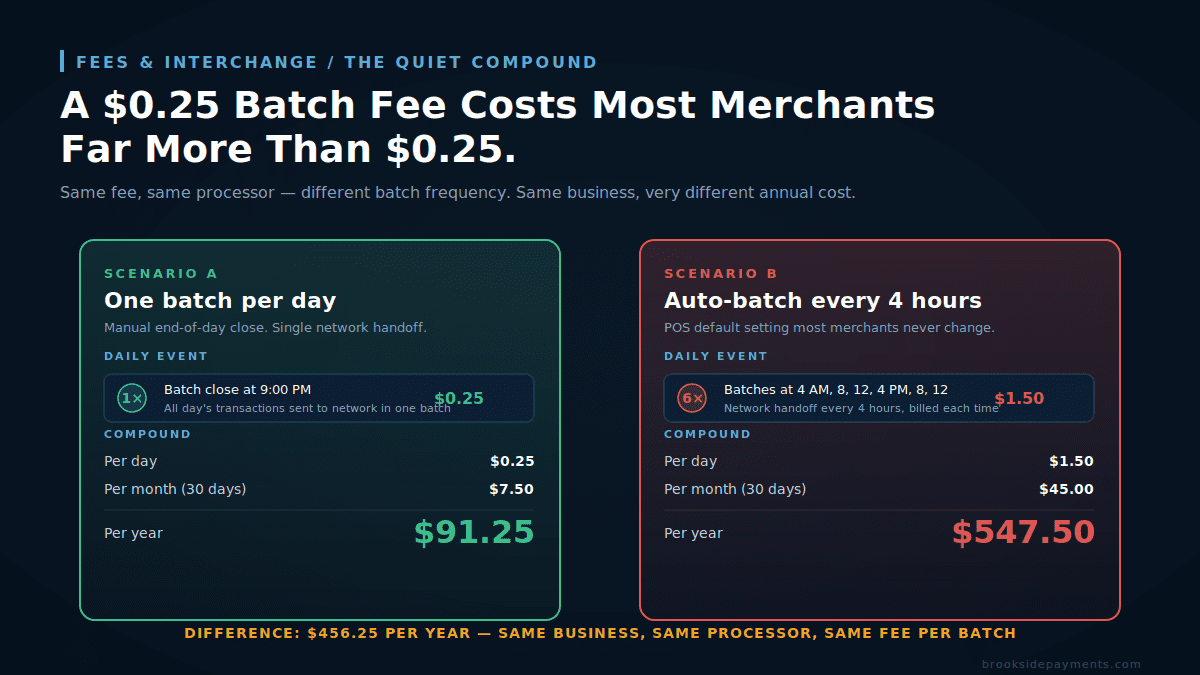
The hero diagram at the top of this post shows the math, but the table version makes it concrete:
| Batch frequency | Per day | Per month | Per year |
|---|---|---|---|
| Once daily (manual close) | $0.25 | $7.50 | $91.25 |
| Twice daily (lunch + close) | $0.50 | $15.00 | $182.50 |
| Three times daily (breakfast/lunch/close) | $0.75 | $22.50 | $273.75 |
| Auto-batch every 4 hours | $1.50 | $45.00 | $547.50 |
| Auto-batch every 2 hours | $3.00 | $90.00 | $1,095.00 |
That table assumes a $0.25 batch fee. A merchant with a $0.30 rate on auto-batch every two hours pays $1,314 per year — for nothing the business operationally required. The cost is invisible because no single statement line is alarming. The smallest unit of pain is $90 a month, and most owners glance at that and move on.
The two-scenarios design of the hero diagram is the actual editorial point of the post. Two merchants with identical businesses, identical processors, and identical pricing can pay 6x different amounts based entirely on a POS setting. The processor is not doing anything wrong. The fee itself is reasonable. The cost difference comes from a default configuration that nobody told you to look at.
What to Look At Tonight on Your POS
Before you do anything else with your processor, find out which scenario you are in. The information is available on every modern POS system, but the menu path varies by vendor. Two ways to get the answer:
1. Pull the daily transaction history for one normal business day. Most POS reporting tools let you filter the day’s activity by batch ID. Count the distinct batch IDs. If you see one, you are batching once a day. If you see four or six, you are auto-batching on a timer.
2. Look at last month’s processing statement and divide your total batch fee charges by your daily rate. If your rate is $0.25 per batch and your statement shows $45 in those charges for the month, you closed 180 batches in 30 days — six per day, every day. That is the auto-batch-every-4-hours setting.
3. Search your POS settings for “batch close,” “auto settlement,” “auto batch,” or “settlement schedule.” The setting is almost always under a “payments” or “processing” or “merchant settings” menu. Common defaults: Clover ships set to auto-batch every few hours; Square batches automatically based on activity; older Verifone and Ingenico terminals are typically configured by the processor at install and never touched again.
Once you have the answer, the fix is mechanical: change the batch close to manual end-of-day, or to once daily on a fixed schedule. On most POS systems this takes 30 seconds. On older terminals, it requires a call to your processor’s tech support and roughly five minutes of menu navigation while they walk you through it. Either way, it is a one-time change that produces savings on every statement going forward.
If your processor uses tiered pricing, batching late or skipping a day can push transactions into a “non-qualified” or “mid-qualified” tier with substantially higher rates. Some interchange categories require settlement within 24 hours for the lowest published rate. The right answer in this case is “batch every night, but only once per night” — not “batch less often.” The goal is one batch per business day, on a manual close, on a consistent schedule.
The Batch Fee Is Not Negotiable. The Processor Choice Is.
If you call your current processor and ask them to lower or waive that fee, you will hear some version of “that is set by our pricing schedule, I can’t adjust it.” That answer is honest. The fee on your account is a function of the contract you signed, and processors generally do not modify individual fee components on existing accounts. They modify them at renewal or when you threaten to leave.
What is negotiable is your overall pricing model. Two structural moves materially change what it costs you:
Move to interchange-plus pricing.
On interchange-plus pricing, the charge is a separate, transparent line item — typically $0.05 to $0.10 per batch on competitively-priced accounts. On flat-rate or tiered pricing, the charge is bundled into the rate or charged at the processor’s standard schedule (often $0.20 to $0.30). Switching pricing models can drop the per-batch cost by 50–75% before any other change.
Audit your full statement, not just the batch fee.
The batch fee is one of a category of small recurring fees (statement fee, monthly minimum fee, PCI compliance fee, batch fee, and infrastructure fee) that individually look small and collectively cost most merchants $400–$1,200 per year. Fixing one in isolation rarely justifies the effort; fixing all of them together makes the math worth it. See our breakdowns of statement fees and monthly minimum fees for the same pattern applied to other line items.
The reason a processor will not lower your batch fee on demand is the same reason most processors quietly default new accounts to auto-batch: small recurring fees are the most stable margin in the entire processing business. Interchange margins compress every year. Network rates rise. The processor’s negotiating room on transactional pricing keeps narrowing. The fixed-fee components — batch, statement, PCI, monthly minimum — are the part of the revenue model that does not move. They keep generating predictable margin regardless of what interchange does.
That is not a critique. It is the math of the industry. It just means the merchant who treats fixed-fee components as ignorable is funding the part of the processor’s P&L the processor protects most carefully.
What This Means For Your Specific Business
Three numbers settle the question for any individual merchant:
- Your per-batch rate. Pull last month’s processing statement. Find the line item labeled “Batch Fee,” “Batch Settlement,” “Daily Batch,” or “Settlement Fee.” Note the per-batch dollar amount. ($0.05 = excellent. $0.10 = good. $0.20 = average. $0.25+ = above average. $0.30+ = high.)
- Your batches per day. Count the distinct batch IDs in one day’s transaction history, or divide your monthly batch fee total by the daily rate × 30. Multiply by 30 for monthly batches.
- Your annual cost from this fee. Multiply rate × batches per day × 365. If the answer is over $200, the POS setting fix alone has a meaningful payback. If the answer is over $500, the fix is mandatory.
The reason this is worth checking instead of dismissing is that it costs nothing and takes ten minutes. If your number turns out to be $90 a year, you have answered the question and you can stop worrying about it. If it turns out to be $730 a year, you have just found a recurring expense that almost every merchant in your situation has and almost none of them know about.
Frequently Asked Questions
Three ways. Pull one normal business day from your POS reporting and filter by batch ID — count the distinct IDs; one means daily manual close, four or six means auto-batching on a timer. Or take last month’s statement and divide total batch fees by your per-batch rate — $45 in batch fees at $0.25 means 180 batches in 30 days, six per day. Or search your POS settings for “batch close,” “auto settlement,” “auto batch,” or “settlement schedule,” usually under a payments or merchant menu. Common defaults: Clover ships set to auto-batch every few hours, Square batches automatically based on activity, older Verifone and Ingenico terminals vary by deployment.
Usually no — at least not on an existing account. Processors generally don’t modify individual fee components mid-contract; they adjust them at renewal or when you threaten to leave. What’s negotiable is the overall pricing model. On interchange-plus, the batch fee is a separate transparent line, typically $0.05 to $0.10 per batch on competitively-priced accounts. On flat-rate or tiered, it’s bundled into the rate or charged at the processor’s standard schedule (often $0.20 to $0.30). Switching pricing models can drop the per-batch cost by 50% to 75% before any other change.
By rough benchmark: $0.05 per batch is excellent, $0.10 is good, $0.20 is average, $0.25 or higher is above average, $0.30 or higher is high. To gauge your annual exposure: multiply your per-batch rate by your batches per day by 365. If the answer is over $200, fixing the POS auto-batch setting alone has a meaningful payback. If the answer is over $500, the fix is mandatory. The reason this is worth checking instead of dismissing is that it costs nothing and takes ten minutes. If your number turns out to be $90 a year, you have answered the question. If it turns out to be $730, you have just found a recurring expense most merchants in your situation share and few of them know about.
Find Out What Your Batch Fee Is Actually Costing You
The POS setting is one fix, and it’s free. The pricing model change is the bigger one. A free statement review identifies your current rate, your batch frequency, and what an interchange-plus account would cost you on the same volume — so you can see the full picture before deciding what to change.
Get Your Free Statement ReviewNo obligation • No pressure • Response within one business day
See what a statement review looks like →