Government Payment Portal: The Standalone Way to Accept Payments

The Third Way to Take a Government Payment
Most guidance on collecting tax and utility payments online assumes the payment page is wired into your tax system — either calling it live through an API or working off an exported roll through bill presentment. There is a third option that connects to nothing, and for a large share of small and mid-size offices it is the most practical one.
It is the standalone government payment portal: a hosted page where a resident picks what they are paying, enters an amount, and pays — with no link back to your CAMA, tax, or ERP system. We cover the two integrated rails in depth on the hub that walks through choosing between an API and bill presentment. This post is about the non-integrated rail that sits outside that decision: what a government payment portal does, where it is the right call, and the one tradeoff you have to manage if you run it.
- Standalone a non-validated payment portal: the resident picks a type and keys the amount; nothing is looked up.
- Bill Presentment looks up the citizen’s exact bill from an exported roll so they pay the amount due.
- API connects live to your tax software to show the current bill and post the payment back.
What a Standalone Portal Actually Is
The cleanest way to tell the three rails apart is one question: does the payment system know anything about the bill? An API knows in real time. Bill presentment knows as of the last export. A standalone government payment portal knows nothing. There is no parcel record behind the page — the resident selects a payment type and keys the amount themselves, the funds land in your account, and nothing is posted back to the tax system. A clerk records it afterward.
The familiar form of this is the virtual terminal — a browser screen where a staff member keys a card for a phone or mail payment. A citizen-facing hosted portal is the same idea pointed outward, and a countertop terminal at the front counter is the same idea in hardware. All three share the defining trait: no data tie to your tax roll.
Does the system know the bill? API: yes, live. Presentment: yes, as of the last snapshot. Standalone portal: no — the resident supplies the amount, and your office supplies the posting.
One Portal, Every Revenue Type
What a standalone government payment portal gives up in integration it makes back in flexibility. Because it is not tied to a single back-office system, one portal can collect every kind of money your office takes — property taxes, water and sewer, licenses and permits, court payments — from a single configurable menu.
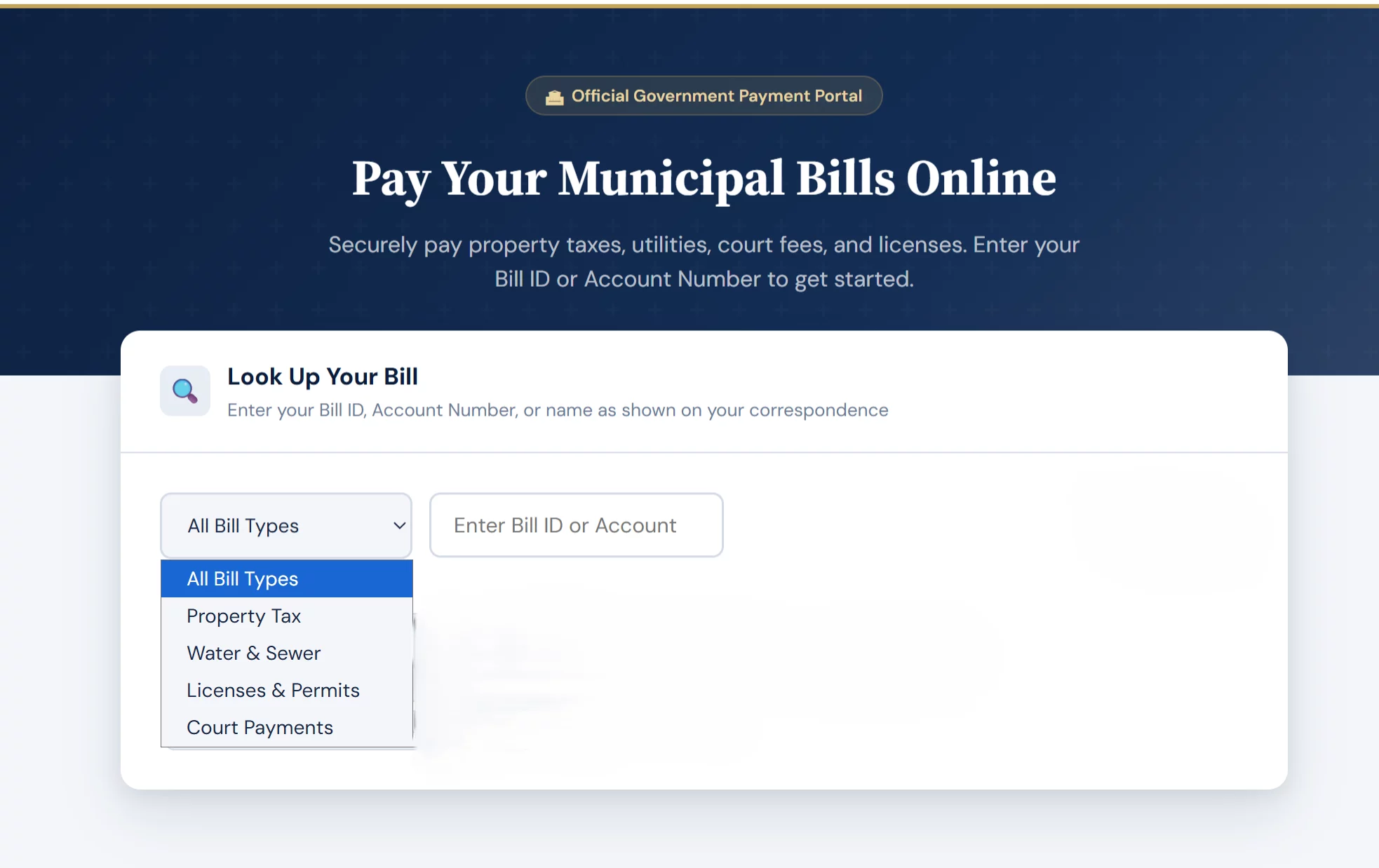
A standalone portal can offer every revenue type from one menu — but the resident keys the amount; there is no balance behind the dropdown.
That breadth is hard to match with the integrated rails. An API or a presentment feed is built against one system at a time, so a township collecting five kinds of revenue could be looking at five separate integration projects. A standalone portal handles all five behind one page.
The other advantage is self-administration. Adding a new payment type, setting its convenience-fee rule, or spinning up a department-branded portal with its own deposit routing is usually something your office configures itself — no vendor change order, no IT ticket. Under presentment you would rework an export job; under an API you would need development time. For the broader picture of how merchant services work on the government side, see our overview of government payment processing.
One portal covers every revenue stream, the office administers it without a developer, and it launches in days rather than a procurement cycle. When integration is not realistic, that combination is decisive.
Nothing Posts Itself
The same missing link that makes a standalone portal flexible also makes it the rail that creates the most back-office work. Because the page never reads or writes your tax system, every payment has to be reconciled and posted by hand. The portal captures the money and routes it to the right account; it does not mark the parcel paid. Someone in your office does.
That is where the most damaging failure in the space lives: a resident pays, the card is charged, but the bill still reads delinquent because the payment has not been keyed back yet — or was keyed to the wrong parcel. The money is in your account; the taxpayer is looking at a past-due notice and, sometimes, accruing penalties. With an API that posting is instant; with presentment it clears in the batch; with a standalone portal it clears only when a person gets to it.
The flexibility can quietly widen that surface. Every additional payment type and every free-text reference field is one more place a resident can mistype an account number or pick the wrong category, and one more thing your staff sorts out at reconciliation.
“Paid but it still shows due” happens because nothing auto-posts. Decide the reconciliation cadence before launch, not after the first complaint — it is the single biggest determinant of whether the portal runs clean.
How to Keep a Standalone Portal Clean
A standalone government payment portal works well when the office builds the reconciliation discipline the rail does not supply on its own. A handful of practices carry most of the weight:
- A required reference field. Make the parcel or account number mandatory at checkout so every payment arrives with the identifier a clerk needs to post it. It is free-text capture, not validation, but it removes the guesswork.
- A daily reconciliation cadence. Decide who posts payments and how often before launch. During tax-season peaks, same-day posting is what keeps “paid but still shows due” from becoming a pattern.
- Clear receipts and confirmation. A confirmation number and an emailed receipt give the resident proof of payment while the office catches up on posting — and cut the volume of “did it go through?” calls.
- Honest convenience-fee disclosure. If you pass a convenience fee, show it before the resident commits, not on the receipt.
- Separate deposit routing per type. Route each payment type to its own account or GL code so reconciliation and reporting line up at close.
The portal is easy to turn on; the posting routine is the part that takes planning. The cadence you set before launch is the difference between a clean portal and a standing complaint queue.
When the Portal Is the Right Call
A standalone government payment portal is the right rail when integration is not realistic — your tax or ERP system exposes no usable API, the integration cost cannot be justified at your volume, or you collect several low-volume revenue streams that would each need their own connection. For many smaller offices that describes the whole situation, and a portal is genuinely the best fit rather than a compromise.
The integrated rails win in narrower cases. If you collect a high volume of fixed annual bills, bill presentment lets residents look up and pay the exact amount due. If your delinquent balances accrue penalties and interest daily, a live API keeps the amount due accurate to the minute. The hub works through that API-versus-presentment decision in full.
The honest version: most offices do not choose a rail in the abstract — they choose based on what their tax system can expose and what they can afford to run. A standalone portal is the answer when the answer to both is “not much,” and run well, it serves residents perfectly fine. For an external reference on vendor selection, the Government Finance Officers Association publishes a best practice on accepting payment cards and selecting a provider.
No integration possible or affordable, or many revenue types to collect: a portal. A high volume of fixed annual bills: presentment. Daily-accruing delinquent balances: an API.
If you want to see how a standalone portal could improve the process flow in your office, contact Brookside at (833) 382-1992 or hello@brooksidepayments.com.
Frequently Asked Questions
Not exactly. A virtual terminal is the keyed, staff-facing form used for phone and mail payments, while a public portal is the resident-facing version. Both are standalone — neither looks up or validates the bill against your tax system.
No. It collects the funds and routes them to the right account, but it does not mark the bill paid. A clerk reconciles and posts each payment, which is why a daily posting cadence matters during peak periods.
Yes. Because it is not tied to one back-office system, a single portal can offer a menu of payment types — taxes, water and sewer, licenses, court fees — each with its own fee rule and deposit routing, usually configured by your office.
Tell Us What You Collect. We’ll Map the Right Rail.
If your office is weighing how to take card payments — a standalone portal, bill presentment, or a live API — the right answer depends on what your tax system can expose and the revenue types you handle. Send Brookside your current setup and what you collect, and we’ll tell you which rail fits and what it takes to run it, usually within a day. Learn more about payment processing consumer protections from the CFPB.
Map Your Government Payment SetupNo obligation • No pressure • Response within one business day
See what a statement review looks like →