Reduce Sage Payment Processing Fees Without Leaving Sage
Reduce Sage Payment Processing Fees Without Leaving Sage
Sage runs the books — invoicing, accounts receivable, the general ledger. When you first turned on card acceptance, you used its own payments, and it worked. What most businesses never notice is that the payments business has changed hands twice since then, and the merchant rate you signed up for mostly rode along untouched. That is how businesses end up overpaying — and why you can reduce Sage payment processing fees without leaving the platform.
The platform itself has moved toward lightweight third-party connectors rather than one built-in processor, which works in your favor: you keep every workflow and change only the economics underneath. The money is in the legacy rate nobody re-shopped, and in the card data your transactions do or do not carry.
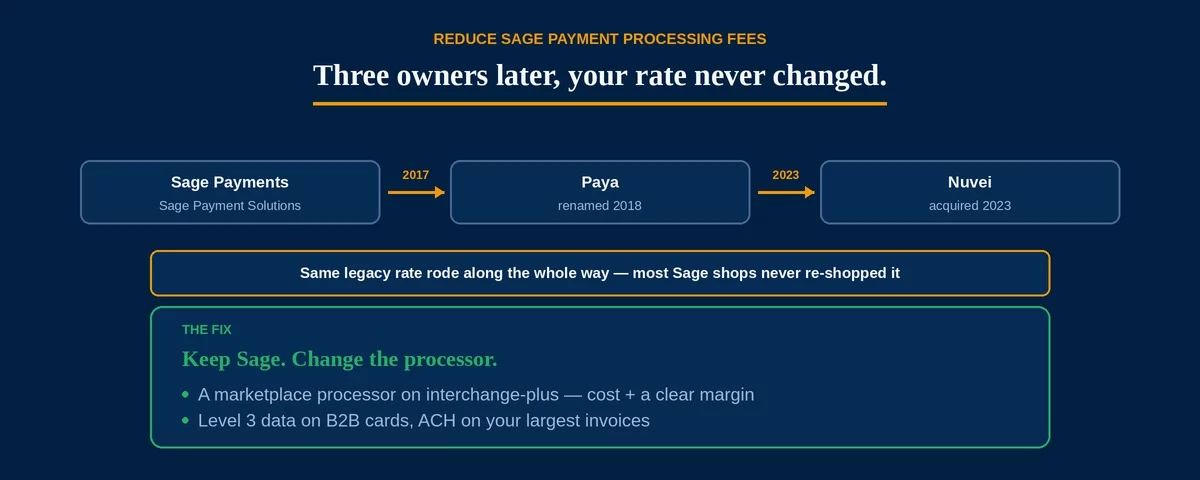
Its native payments began as Sage Payment Solutions. The North American business was sold in 2017, renamed Paya, and acquired by Nuvei in 2023. The platform still runs for existing merchants, but the ownership churn means many accounts sit on a rate that has not been competitively reviewed in years.
Why Three Owners Never Lowered Your Rate
Ownership changes rarely reach down to your effective rate. Each transition kept the lights on for existing merchants, but nobody had a reason to renegotiate the deal you already had. Meanwhile the rate feels settled — payments post against invoices, reconciliation works, and re-shopping a processor feels like a project. So a number set years ago, under a company that no longer exists by that name, quietly becomes the most expensive line on your statement — and re-shopping it is the first step to reduce Sage payment processing fees.
A bundled, one-size rate is built to be easy, not cheap. It folds the network’s real cost into a single percentage you cannot see inside, which is harmless on small tickets and expensive on large ones. That blend is the gap you are closing when you set out to reduce Sage payment processing fees.
A rate you never re-examine is a rate that never improves. The longer payments have quietly worked, the more likely the pricing is years out of date — and on B2B volume, out of date means overpaying.
Large B2B Invoices Carry the Most Markup
Its install base runs deep in manufacturing, distribution, construction, and professional services — businesses that bill other businesses on large invoices and net terms. That is precisely where a flat percentage does the most damage. A $40,000 invoice on a 2.9% bundled rate costs $1,160 in fees; the same invoice on interchange-plus pricing, with Level 2 and Level 3 data attached, can land far lower, because qualifying a commercial card unlocks the B2B interchange built for exactly these transactions.
- Flat bundled rate at 2.9%: $1,160 in fees
- Interchange-plus with Level 3 data, roughly 1.9% all-in: about $760
- Difference on a single invoice: about $400 — illustrative, and the real figure moves with card mix and margin
Most Sage payment setups never pass Level 2/3 data, so commercial cards drop to the most expensive interchange the network offers. Closing that gap across a year of invoices is the single biggest way to reduce Sage payment processing fees — and it is the same problem the manufacturing and wholesale guides describe; it is simply where the markup lives for finance-run businesses.
How to Reduce Sage Payment Processing Fees
Because Sage now leans on marketplace connectors, moving to a better processor is a reconfiguration, not a migration. There are three moves that reduce Sage payment processing fees, and they work across Sage 50, 100, 300, and Intacct without disrupting a workflow.
One: move to a marketplace processor on interchange-plus. A natively integrated processor posts payments inside the platform exactly as today, but prices at the network’s real cost plus a transparent margin instead of a blended legacy rate.
Two: turn on Level 2 and Level 3 data. Submitting line-item detail qualifies your commercial-card transactions for materially lower B2B interchange. It is the most valuable lever and the one most setups leave off, so it is worth understanding how Level 2 and Level 3 data work before you choose a processor.
Three: route your largest invoices to ACH. The platform handles ACH payments alongside cards, and a flat-dollar bank-rail fee beats a percentage on a five- or six-figure invoice.
A shop running a few million a year in card volume typically leaves five figures on the table under a legacy bundled rate. A native interchange-plus processor, Level 3 data, and an ACH path for the biggest invoices recover most of it — and your team keeps working entirely inside Sage.
Moving processors inside Sage is routine but not instant. Confirm the connector supports your version, test before going live, and keep the old processor active long enough to settle pending authorizations and process refunds on transactions it already handled.
Running a different platform changes the details. If you are on NetSuite or SAP Business One, the story is similar with different tools — as it is on Epicor, Fishbowl, and Business Central; if you are on QuickBooks, start with reduce QuickBooks payment processing fees instead.
Frequently Asked Questions
Yes. Sage integrates with a marketplace of processors, so you can keep Sage 50, 100, 300, or Intacct and the workflows your team knows, and simply place a cheaper interchange-plus processor behind them. You change the rate and the data, not the platform — which is how you reduce Sage payment processing fees without a migration.
The platform continues for existing merchants, but the business was renamed Paya in 2018 and acquired by Nuvei in 2023, and new accounts are issued under those brands. The practical effect is that many merchants are on a rate that predates the ownership changes and has never been re-shopped.
Yes, with a processor that supports it. The platform can submit the line-item detail that qualifies commercial cards for lower interchange — most setups simply never turn it on. Enabling it is the single biggest saving on large B2B invoices.
Send Us One Sage Statement. We’ll Show You the Markup.
If your payments run through Sage’s native processor and the rate hasn’t been reviewed since before the Paya or Nuvei changes, there is a good chance you can reduce Sage payment processing fees on every large invoice. Send Brookside one recent processing statement and a sample invoice, and we’ll calculate your real effective rate, flag whether Level 2/3 data is being passed, and show you what a native interchange-plus processor would save — without changing how Sage works. The math takes us about fifteen minutes. Learn more about payment processing consumer protections from the CFPB.
Send Your Statement for a Free ReviewNo obligation • No pressure • Response within one business day
See what a statement review looks like →