Reduce Epicor Payment Processing Fees Without Leaving Epicor
Reduce Epicor Payment Processing Fees Without Leaving Epicor
Epicor runs the plant — production, inventory, purchasing, accounts receivable. So when you turned on card acceptance, Epicor Payment Exchange was right there, native and simple, and you switched it on. The rate looked fine, got approved once, and has priced every card payment since. That is exactly how job shops and industrial manufacturers end up overpaying — and why you can reduce Epicor payment processing fees without ripping anything out.
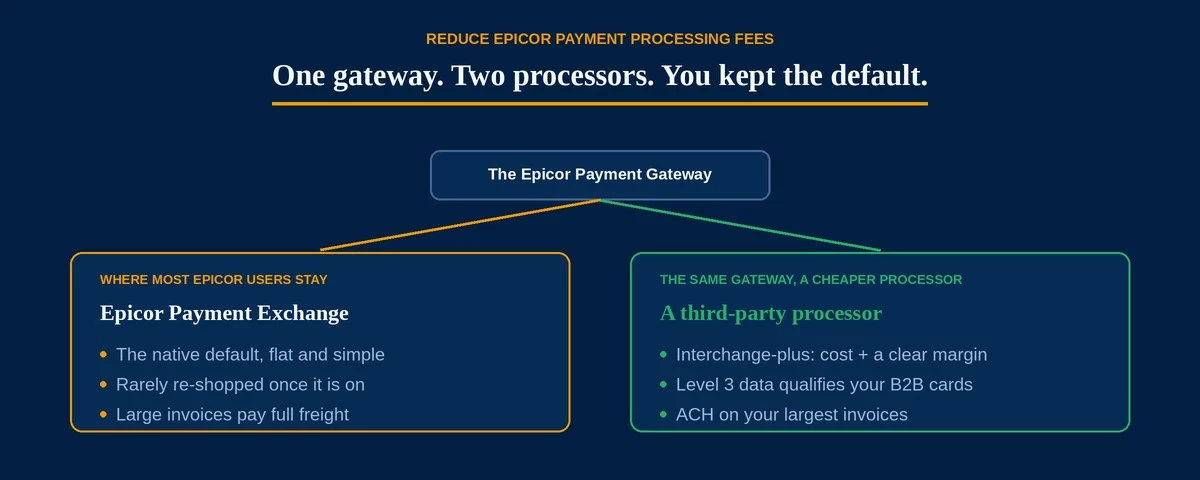
Here is the part most shops miss: the Epicor Payment Gateway was built to connect to a third-party processor, not only to EPX. You keep every workflow and change only the economics underneath. The money is in the flat rate EPX quietly locked in, and in the card data your transactions do or do not carry.
Epicor Payment Exchange (EPX) is the native processing option, marketed on simplicity and no separate gateway fees. But the Epicor Payment Gateway it runs through can connect to either EPX or a third-party processor — so the door to a cheaper rate is already built into the software you own.
Why the EPX Rate Rarely Gets Questioned
The convenience is real, and so is the cost. EPX is the path of least resistance: it is native, it is quick to enable, and it comes with a single point of support. Once payments post cleanly against invoices, the rate stops being a question. Most shops never revisit it — switching processors feels like a project, so a flat rate that was fine at signup quietly becomes the most expensive line on the statement — and re-shopping it is the first step to reduce Epicor payment processing fees.
A bundled, one-size rate is built to be easy, not cheap. It folds the network’s real cost into a single percentage you cannot see inside, which is harmless on small tickets and expensive on large ones. That blend is the gap you are closing when you set out to reduce Epicor payment processing fees.
Native and simple is not the same as competitive. Letting the ERP pick the processor saves a week at setup and can cost five figures a year afterward — because the rate stops being examined the moment payments reconcile cleanly.
Large B2B Invoices Carry the Most Markup
Its core market is job shops, industrial equipment, and mid-market manufacturers — businesses that bill other businesses on large orders, deposits, and progress payments. That is precisely where a flat percentage does the most damage. A $40,000 order on a 2.9% bundled rate costs $1,160 in fees; the same order on interchange-plus pricing, with Level 2 and Level 3 data attached, can land far lower, because qualifying a commercial card unlocks the B2B interchange built for exactly these transactions.
- Flat bundled rate at 2.9%: $1,160 in fees
- Interchange-plus with Level 3 data, roughly 1.9% all-in: about $760
- Difference on a single invoice: about $400 — illustrative, and the real figure moves with card mix and margin
Most setups never pass Level 2/3 data, so commercial cards drop to the most expensive interchange the network offers. Closing that gap across a year of orders is the single biggest way to reduce Epicor payment processing fees — and it is the same problem the manufacturing and wholesale guides describe; the ERP is simply where it lives for these shops.
How to Reduce Epicor Payment Processing Fees
Because the Epicor Payment Gateway already connects to third-party processors, the fix is a reconfiguration, not a migration. There are three moves that reduce Epicor payment processing fees, and the platform supports all three without disrupting a workflow.
One: run a third-party processor through the Epicor gateway. You point the same gateway at an interchange-plus processor instead of the bundled default, so transactions still post inside the platform exactly as they do today — only the rate changes.
Two: turn on Level 2 and Level 3 data. Submitting line-item detail qualifies your commercial-card transactions for materially lower B2B interchange. It is the most valuable lever and the one most setups skip, so it is worth understanding how Level 2 and Level 3 data work before you choose a processor.
Three: route your largest invoices to ACH. The platform handles ACH payments alongside cards, and a flat-dollar bank-rail fee beats a percentage on a five- or six-figure order.
A shop running a few million a year in card volume typically leaves five figures on the table under a bundled rate. A third-party interchange-plus processor, Level 3 data, and an ACH path for the biggest invoices recover most of it — and your team keeps working entirely inside Epicor.
Re-pointing the gateway to a new processor is routine but not instant. Test the connection before going live, and keep the old processor active long enough to settle pending authorizations and process refunds on transactions it already handled.
Running a different platform changes the details. If you are on NetSuite or SAP Business One, the lock-in is similar with different tools — as it is on Sage, Fishbowl, Business Central, and Acumatica; if you are on QuickBooks rather than a full ERP, start with reduce QuickBooks payment processing fees instead.
Frequently Asked Questions
Yes. The Epicor Payment Gateway connects to third-party processors, so you can run a cheaper interchange-plus processor through it while every order, invoice, and reconciliation workflow stays exactly the same. You change the rate and the data, not the ERP — which is how you reduce Epicor payment processing fees without a migration.
Epicor Payment Exchange is the native default — fast to enable, single point of support, and a bundled rate. A third-party processor runs through the same gateway but lets you place interchange-plus pricing and enhanced data, which usually costs less on large B2B volume.
Yes, with a processor that supports it. The platform can submit the line-item detail that qualifies commercial cards for lower interchange — most setups simply never turn it on. Enabling it is the single biggest saving on large B2B invoices.
Send Us One Epicor Statement. We’ll Show You the Markup.
If your payments run through Epicor Payment Exchange and the rate hasn’t been looked at since setup, there is a good chance you can reduce Epicor payment processing fees on every large invoice. Send Brookside one recent processing statement and a sample invoice, and we’ll calculate your real effective rate, flag whether Level 2/3 data is being passed, and show you what a third-party interchange-plus processor through your gateway would save — without changing how Epicor works. The math takes us about fifteen minutes. Learn more about payment processing consumer protections from the CFPB.
Send Your Statement for a Free ReviewNo obligation • No pressure • Response within one business day
See what a statement review looks like →